To automate supplier RFQs without replacing SAP or any other ERP, you add an AI layer that works between your ERP, email and spreadsheets. It drafts each request for quotation from an approved requisition, sends it to suppliers, chases late replies, reads every quote and normalizes the prices. Buyers approve the supplier, and the result is written back to the ERP, which stays the system of record. It works the same way on SAP, Oracle, Microsoft Dynamics or a homegrown system.
Heizen builds this kind of RFQ automation as part of its custom AI procurement work. We map how a sourcing team actually runs its RFQs, then build AI agents that connect to whichever ERP the company runs, plus shared inboxes and approval systems. Nothing in the ERP is replaced, most projects go live in 6 to 8 weeks, and the company owns the finished system.
Understanding with an Example
Picture a Monday at 9 am. A sourcing manager opens the ERP and finds 14 released purchase requisitions waiting for quotes. Each one needs three to five suppliers, so that is more than 50 emails to write before lunch. By Wednesday, a third haven't replied, two have sent PDFs in different units, and the RFQs in the ERP still show no quotations, because someone has to type them in. This guide shows how to take that work off the team's plate without touching the ERP.
Why are supplier RFQs still so manual when an ERP is in place?
An ERP like SAP or Oracle is very good at recording an RFQ. What it doesn't do on its own is the messy work around the record: writing to suppliers, reading whatever comes back, and following up when nobody answers. SAP's own training material for sourcing in S/4HANA notes that RFQs can be sent to suppliers by email or mail, with the quotations then entered manually.
That work lands on teams that are already stretched. The Hackett Group's 2025 Key Issues Study projected that procurement workloads would rise 10% in 2025 while budgets grew only 1%, an efficiency gap of 9%. And the bottleneck is rarely one system. It is the gaps between them: copying requisition lines into emails, retyping supplier replies into Excel, and keying the winner back into the ERP.
What changes when supplier RFQs are automated around your ERP?
The RFQ stages stay the same; what changes is who moves the work forward. In Heizen's RFQ automation, a set of AI agents connects six sourcing stages, from purchase request to supplier award, while your team makes every final decision:
Notice what doesn't change: the ERP, the release strategy and who approves what. Still deciding between a sourcing suite and building around your ERP?
How does RFQ automation work without replacing your ERP?
Your ERP keeps holding the official record and enforcing release rules. An AI agent takes on the steps between systems, and a person approves at the two points that matter: before anything goes to a supplier, and before a supplier is chosen.
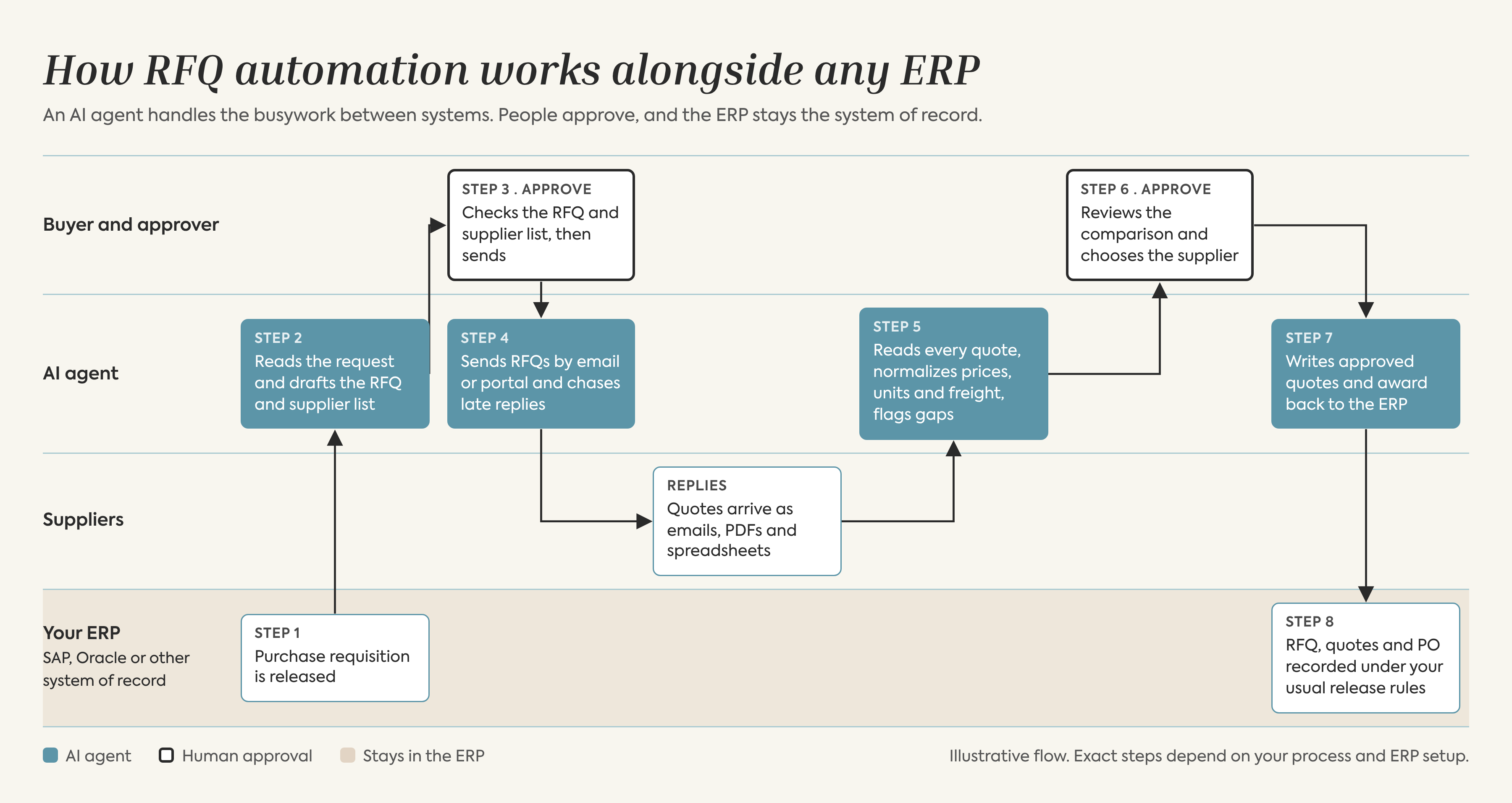
How RFQ automation works alongside any ERP: an AI agent handles drafting, outreach and quote normalization, buyers approve, and the ERP stays the system of record.
How does a purchase request become an RFQ?
RFQ intake starts when a purchase requisition is released in the ERP, or when a request arrives by email or form. The agent captures the material, quantity, timing and anything suppliers need to quote, drafts the RFQ and suggests suppliers, ranked against your supplier evaluation scorecard. Nothing goes out until the buyer approves it.
How are supplier responses and negotiation rounds tracked?
Supplier outreach goes out by email or portal, with specs and a reply deadline. The agent tracks who has responded, sends polite reminders to the rest, and keeps every revised offer from negotiation rounds so the latest bid is always the one evaluated.
How are supplier quotes read and compared?
This is where most of the time is saved. The agent pulls prices, payment terms and lead times out of each quote, converts currencies, lines up units such as per piece versus per box of 100, and flags quotes that are missing details or priced in a different way, so the team knows what to clarify before deciding.
What does the data look like between the agent and the ERP?
Here is a simplified, illustrative example of one normalized quote. Field names map to your own ERP fields in a real project.
Notice the flag. The agent doesn't guess the missing freight cost; it marks the gap for the buyer.
How do approved quotes get written back to the ERP?
A practical architecture keeps the agent's access narrow:
· The ERP stays the source of truth. If the agent is switched off, your RFQ data is still complete in the ERP.
· The agent reads what it needs. That means the requisition, the material master and the vendor master in the ERP, plus supplier replies and attachments from your existing mailbox.
· The agent writes as little as possible. Usually one thing, such as the approved award or a draft purchase order, and only after a person approves the decision card. The purchase order then follows your usual release strategy.
· Exceptions go to a person. No reply from a supplier, a quote that can't be read, or a price far outside the last purchase price is sent to a buyer instead of being decided by the agent.
Writes go through a standard interface your IT team already allows. On SAP, for example, S/4HANA publishes APIs for requests for quotation and supplier quotations, and older ECC systems are often connected through BAPIs or IDocs.
Does this only work with SAP?
No. The agent works in the email, PDFs and spreadsheets around the ERP, so the same RFQ automation can sit on top of Oracle, Microsoft Dynamics or a homegrown system. Only the write-back connection changes.
What can go wrong with supplier RFQ automation?
Most RFQ automation problems come from the process, not the technology. Plan for three risks from day one:
· Vendor master quality. If supplier emails, material descriptions or units of measure are wrong in the ERP, the agent will repeat the mistake faster. Clean the records for your top suppliers first.
· Permissions that are too wide. Keep write access as small as possible. Narrow permissions make security reviews quicker and mistakes smaller.
· No full log. Every RFQ sent, quote read, reminder, recommendation and approval should be recorded, so anyone can see later who decided what and why.
Also watch for problems that slip through between RFQ and PO, such as duplicate requests and mismatched quantities.
What does RFQ automation look like in practice?
Two Heizen projects show what this looks like in practice:
· Godrej Consumer Products (GCPL). Supplier quotes used to live in inboxes, handled by email and re-entered by hand. Heizen built an RFQ workflow on the vendor and material records from an earlier cost-intelligence project. It tracks supplier dispatch and responses, uses AI to extract quotes and sort them into four triage queues, ranks suppliers on landed cost, and records a justification whenever the award doesn't go to the lowest bidder. Award decisions stay with people.
· Al Bahja Group . Purchasing across the group's companies and sites ran on paper, email, Excel, Word and PDFs, with limited use of Oracle. Heizen is building a shared procurement platform that connects each request to RFQs, supplier quotes, comparison and the purchase order, without replacing their existing systems. Suppliers reply through their own portal, new sourcing needs at least three quotes, and offers are compared on price, delivery period, payment terms and certifications. The system recommends a supplier, but the buyer can choose another, and the Purchase Head approves before any PO is released. The procurement module is built and in testing ahead of user acceptance.
Christopher Sawchuk, principal and Global Procurement Executive Advisory practice leader at The Hackett Group, said in April 2025: “Procurement organizations must accelerate AI adoption to unlock new levels of efficiency and value creation.”
What should be on your RFQ automation implementation checklist?
Use this checklist before you automate supplier RFQs in your ERP.
1. Pick one category to start. Choose a high-volume category with repeat suppliers, such as MRO spares or packaging.
2. Map the current RFQ journey. List every step from requisition to PO, including the ones in inboxes and spreadsheets.
3. Agree the approval points. Decide who approves outreach, who approves the award, and what value thresholds apply.
4. Confirm ERP access with IT. Agree which interfaces the agent uses, keep its write access narrow, and switch on full logging.
5. Define what ‘complete’ means for a quote. List the fields every quote needs, such as price, unit, freight, lead time and validity.
6. Measure a baseline. Record today's cycle time and hours per RFQ so you can compare later.
7. Run in parallel first. Let the agent work alongside the team for a few weeks before it handles the category on its own.
Frequently asked questions
Can you automate supplier RFQs without replacing SAP or your ERP?
Yes. An AI layer can handle drafting, supplier outreach, follow-ups and quote normalization outside the ERP, then write approved results back through its standard interfaces. The ERP stays the system of record.
Does AI RFQ automation send quotes or awards without human approval?
It shouldn't. In a well-designed setup, a buyer approves outreach before it goes to suppliers, and approves the award before anything is written back to the ERP. Every action is logged.
How long does it take to automate supplier RFQs alongside an ERP?
Most Heizen projects go live in 6 to 8 weeks, with a working prototype on your own data in the first couple of weeks.
How much does it cost to automate supplier RFQs without replacing your ERP?
The cost depends on how many categories, steps and systems are involved. Heizen bills sprint by sprint, after delivery.
Conclusion
ERP was never the bottleneck in supplier RFQs. The inbox is. Writing RFQs, chasing suppliers and retyping quotes eat most of a buyer's week. AI RFQ automation handles that work alongside SAP, Oracle or any other ERP, with no new platform and no migration. The ERP stays the system of record, and buyers still approve every supplier and every award.
If you want to see how this would fit your own ERP setup, ask us for an architecture walkthrough, or book a free 30-minute procurement diagnostic and we'll tell you honestly whether RFQ automation is the right first step.
Sources
· The Hackett Group, “The Hackett Group: 64% of Procurement Leaders Say AI Will Transform Their Jobs” (press release, 10 Apr 2025): https://www.thehackettgroup.com/the-hackett-group-procurement-leaders-say-ai-will-transform-their-jobs/
· SAP Learning, “Working with Requests for Quotation” (Sourcing in SAP S/4HANA): https://learning.sap.com/courses/sourcing-in-sap-s4hana/working-with-requests-for-quotation
· Heizen case studies: https://heizen.work/case-studies